
Microsoft Teams Walkie-Talkie feature now available for all Android and iOS users
The Microsoft Teams Walkie-Talkie works on push-to-talk communication technology. Using the feature, users can communicate with other users on the same channel.
- Tech News
- 2 min read

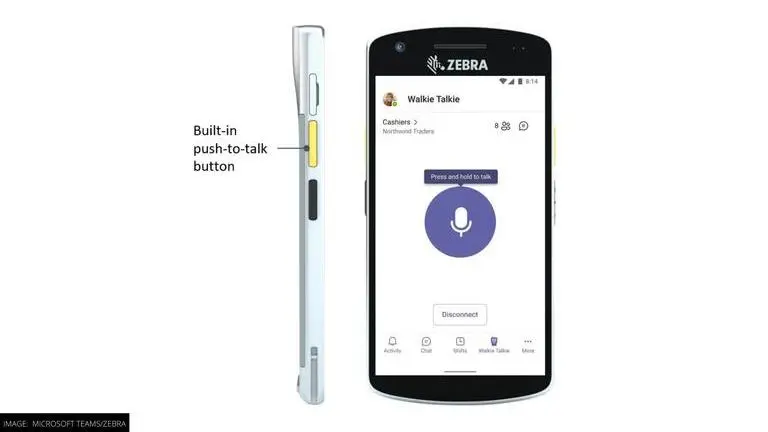
Microsoft Teams users will now be able to use Walkie Talkie on Android, iOS and Zebra mobile devices. The feature was launched some ago but was only available for Android users. Now it is available to regular Microsoft Teams users as well. It will allow users to communicate with each other at workplaces or in the field to communicate with each other. Keep reading to know more about the Microsoft Teams Walkie Talkie feature and how to enable it.
As mentioned in the official Microsoft blog "with Walkie Talkie in Teams, frontline workers can now securely communicate with a familiar PTT experience without needing to carry bulky radios, and Walkie Talkie works anywhere with WiFi or cellular internet connectivity." In addition to Android and iOS devices, the Microsoft Teams Walkie-Talkie feature is now available on Zebra mobiles as well.
How does the Microsoft Teams Walkie-Talkie feature work?
The Microsoft Teams Walkie-Talkie works on push-to-talk communication technology. Using the feature, users can communicate with other users on the same channel. Microsoft says that "only users who connect to Walkie Talkie in a channel become participants and can communicate with each other using push-to-talk, one at a time." The feature works on both cellular data and Wi-Fi connections.
In simple words, Microsoft Teams users will be able to communicate with each other using a built-in feature that transmits voice while a user taps on the microphone located at the centre of the feature's interface. The voice through the user's microphone then travels over communication waves on the internet and can be decoded by the listener's device, who can listen to the message and then reply back.
Advertisement
The feature is available for both Android devices through Google Mobile Services and iOS devices. However, it is not pre-installed on the application. It can be enabled by admins of an organization. To do this, admins need to add Walkie Talkie to the App Setup Policy assigned to users from the Teams Admin Center. As and when the feature is enabled by admins for members of a channel, it will be available on the user's app within 48 hours.