
Google's new AI tool: How to use Gemini to create images in Docs
The new image generation capabilities in Google Docs are available to only Google Workspace subscribers, much like the cover image generation tools.

;'%3e%3cpath%20d='m8,15.99c4.41,0,7.99-3.58,7.99-7.99S12.41,0,8,0,0,3.59,0,8s3.58,7.99,7.99,7.99Z'%20style='stroke:%23fff;%20stroke-miterlimit:10;%20stroke-width:.02px;'/%3e%3cpath%20d='m3.08,3.37l3.82,5.11-3.84,4.15h.87l3.37-3.64,2.72,3.64h2.94l-4.04-5.39,3.58-3.87h-.86l-3.1,3.35-2.5-3.35h-2.94Zm1.27.64h1.35l5.97,7.99h-1.35l-5.97-7.99Z'%20style='fill:%23fff;'/%3e%3c/g%3e%3c/svg%3e)


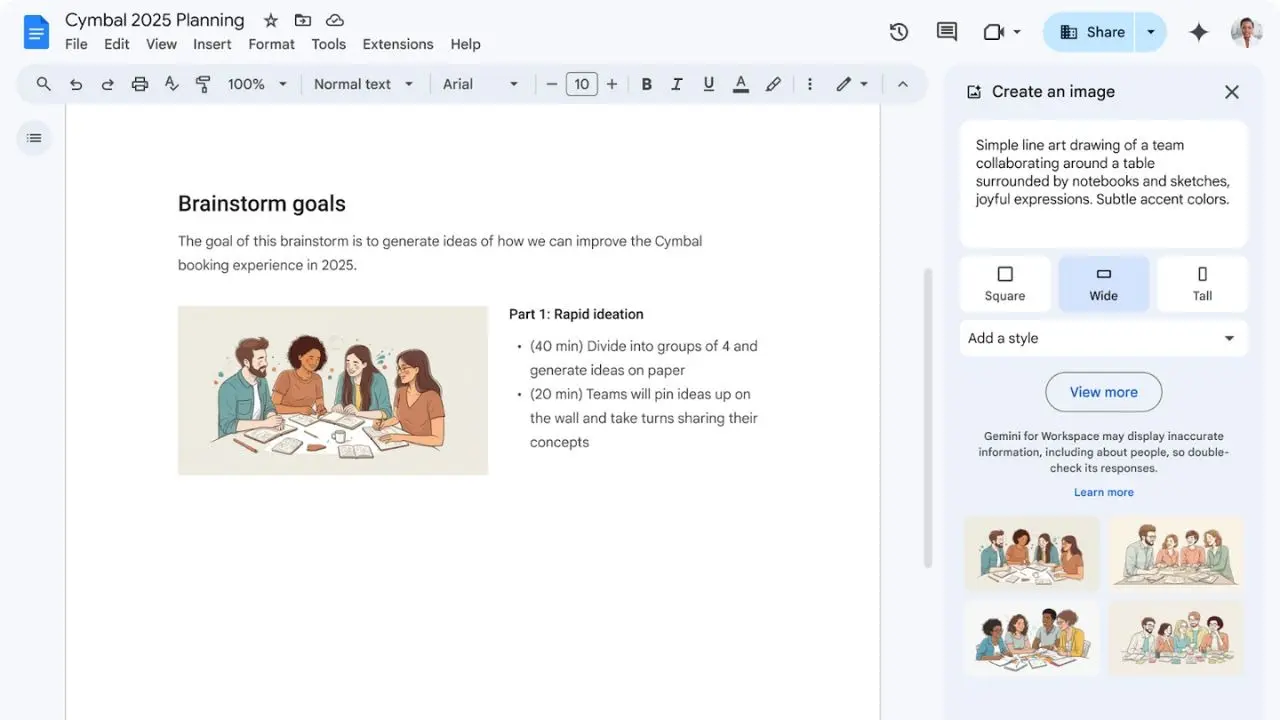
Google is making its document and word processor smarter by adding new artificial intelligence tools. Months after Google Docs was upgraded with Gemini integration to create full-bleed cover images, Google is expanding Gemini functionality in Docs to allow users to create high-quality images, which they can insert into any document.
The Gemini integration in Google Docs lets users create "photorealistic images of people, landscapes, and more with even better detail than before." Powered by Google's Imagen 3 image generation model, the new image generation capabilities offer customisation for image size, aspect ratio, and photography styles, such as watercolour. "You can further customise your document by creating a unique cover image using Gemini in Docs, which can add flavour to a résumé, stylise an invitation, or personalise a client pitch," said Google in a blog post.
How to use Gemini's image generation feature in Google Docs
Google Docs users can navigate to the Insert menu from the top bar and then click the new "Help me create an image" option in the sub-menu. This will open a new Create an image panel in the sidebar with a text box where users can enter a prompt, based on which the image will be created. The sidebar tool also has three aspect ratios and a dropdown menu consisting of different styles. Hitting the Create button will generate four options, which users can choose from. Users can also request more options and choose the one they want to add as an in-line image in their document.
The new image generation capabilities in Google Docs are available to only Google Workspace subscribers, much like the cover image generation tools. Google said the feature will be available to Workspace users with subscriptions to Gemini Business, Gemini Enterprise, Gemini Education, Gemini Education Premium, and Google One AI Premium. The company also said that while the extended rollout for Rapid Release domains has now started, the gradual rollout for Scheduled Release domains will begin on December 16.