
Turning 18? Step-by-Step Guide To Register As a First Time Voter
Registering as a voter involves online or offline submission of Form 6 with accurate details and necessary documents.
- Election News
- 5 min read

;'%3e%3cpath%20d='m8,15.99c4.41,0,7.99-3.58,7.99-7.99S12.41,0,8,0,0,3.59,0,8s3.58,7.99,7.99,7.99Z'%20style='stroke:%23fff;%20stroke-miterlimit:10;%20stroke-width:.02px;'/%3e%3cpath%20d='m3.08,3.37l3.82,5.11-3.84,4.15h.87l3.37-3.64,2.72,3.64h2.94l-4.04-5.39,3.58-3.87h-.86l-3.1,3.35-2.5-3.35h-2.94Zm1.27.64h1.35l5.97,7.99h-1.35l-5.97-7.99Z'%20style='fill:%23fff;'/%3e%3c/g%3e%3c/svg%3e)



The Lok Sabha elections are just a few months away and many countrymen are going to be the first time voters. As responsible citizens, it is our moral duty and responsibility to caste votes and choose the best leader for the betterment of the country. And to cast a vote, you will need a voting ID or Elector’s Photo ID card.
What is Voter ID Registration?
Voter registration is a crucial step for Indian citizens above the age of 18 to participate in elections. It involves enrolling with the Election Commission of India (ECI) to obtain a Voter ID card, which serves as proof of citizenship and eligibility to vote.
The Voter ID card is a key document that identifies individuals listed in the electoral rolls, the official list of eligible voters. This registration process helps in preventing fraud and ensuring the efficiency of the voting process, particularly given India's large population. Registering for a Voter ID card is a straightforward procedure that can be completed online.
What is the Eligibility Criteria To Register As A Voter In India?
The eligible criteria for a person to register as a voter in India.
Advertisement
- Indian Citizen
- 18 years of age
- Permanent Address in India
How to Register As First Time Voter in India?
As an Indian citizen you can register your voter ID offline and online, in both ways.
How to Register Voter ID Online:
You can register as a first time voter by following the steps given below:
Advertisement
Step 1: first visit the Voters’ Official Portal to start the process at https://voters.eci.gov.in/.

Step 2: Now click on the Sign Up button which is located on the top right corner on the homepage.
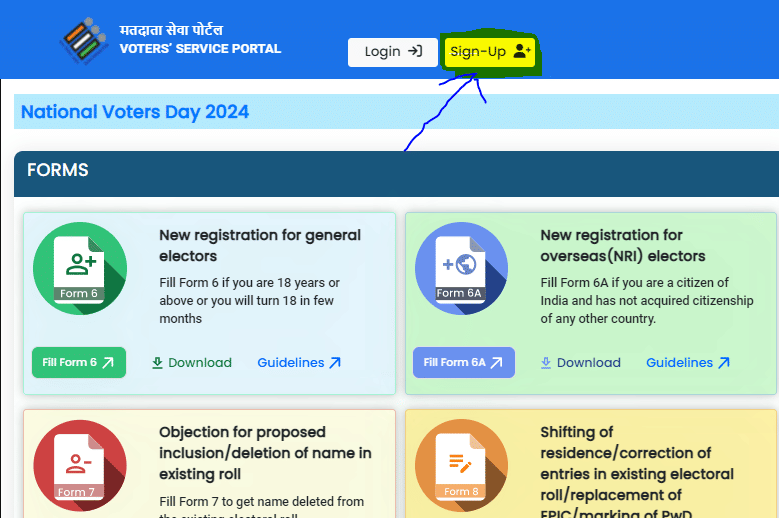
Step 3: After clicking on the sign up on the new tab will open and put your mobile number and then email address (optional). There is a captcha code, fill it and then click the ‘Continue’ button.
Step 4: Now a new window will open in which you have to put your First Name, Last Name. Then put a password and again confirm the password.

Step 5: After completing the step, you will receive an OTP on your mobile number and a given email ID. Click ‘verify’ email.

Step 6: Now After completing the Sign Up, you will be back on the homepage and now click on the Login button. Here enter the mobile number, password, and captcha and click on the ‘Request OTP’ button.

Step 7: Here enter the OTP that you have received on the mobile number and click on the ‘Verify & Login’ button.
Step 8: Now click on the ‘Fill Form 6’ on the ‘New registration for general electors’ tab placed on the homepage.

Step 9: Please fill in all the required information on Form 6, including personal details, details of relatives, contact information, Aadhaar details, date of birth, address details, and the declaration. Upload the necessary documents in the designated sections, then proceed to click the 'Preview and Submit' button.
Step 10: For the final step, just check all the details that you have filled and click the submit button.
Offline Voter Registration Can be Completed Through the Following Steps:
Step 1: Visit the office of the Booth Level Officer (BLO) to collect Form 6 or download it from the Voter Services Portal by clicking the 'Download' button under the 'New registration for general electors' tab.
Step 2: Complete Form 6 with accurate information.
Step 3: Submit the filled form along with the necessary documents to the BLO.
Verification Process of Voting ID:
Upon submission of Form 6, whether through offline or online channels, the verification process is initiated by the Booth Level Officer (BLO). This verification involves cross-referencing the address provided in the submitted document with the Election Commission's standards, ensuring its authenticity.
If any inconsistencies are detected during this verification process, the application is rejected, and the applicant will not receive a Voter ID. In such instances, the individual must submit a fresh application.
Upon successful completion of the verification without any issues, the applicant becomes eligible for a valid Voter ID. This ID is typically dispatched via post or email to the specified address within 15 to 21 days following the conclusion of the verification process.
Required Documents For the Voter Registration Process:
Address Proof:
- Recent utility bills (e.g., water, electricity, or gas bills dated within the last year).
- Current passbook from a nationalized or scheduled bank or post office.
- Registered rental or lease agreement (if applicable).
- Registered sale deed (if applicable).
- Aadhaar card.
- Indian Passport.
- Land-owning records from the revenue department, such as KisanBahi.
Proof of Date of Birth:
- Class X or XII certificates issued by CBSE, ICSE, or State Education Boards, containing the date of birth.
- Birth certificate issued by a competent local body, municipal authority, or Registrar of births and deaths.
- Driving license.
- Aadhaar card.
- PAN card.
- Indian Passport.
Additionally, two recent passport-sized photographs are required, taken within six months prior to submission.
How to Voter Registration Status, Follow These Steps:
1. Go to the official Voter Services Portal.
2. Click on the 'Login' button.
3. Provide your mobile number, password, and captcha code, then click 'Request OTP'.
4. Enter the OTP received and click 'Verify and Login'.
5. Navigate to the 'Track Application Status' tab.
6. Enter your unique reference number, select your state, and click 'Submit'.
7. Your voter registration status will be shown on the screen.
The reference ID is a unique identifier assigned to your registration application. You'll receive it in the acknowledgment slip after submitting Form 6.
Alternatively, you can visit your area's Electoral Registration Officer (ERO) and provide your name, date of birth, and address for status verification. The ERO will assist you in checking your voter registration status.
For More Information Visit Website of Election Commission of India: https://eci.gov.in