
How to Recover Data From Physically Damaged Hard Disk Drives?
In most cases, data can be recovered from a physically damaged hard drive.
- Initiatives News
- 4 min read

;'%3e%3cpath%20d='m8,15.99c4.41,0,7.99-3.58,7.99-7.99S12.41,0,8,0,0,3.59,0,8s3.58,7.99,7.99,7.99Z'%20style='stroke:%23fff;%20stroke-miterlimit:10;%20stroke-width:.02px;'/%3e%3cpath%20d='m3.08,3.37l3.82,5.11-3.84,4.15h.87l3.37-3.64,2.72,3.64h2.94l-4.04-5.39,3.58-3.87h-.86l-3.1,3.35-2.5-3.35h-2.94Zm1.27.64h1.35l5.97,7.99h-1.35l-5.97-7.99Z'%20style='fill:%23fff;'/%3e%3c/g%3e%3c/svg%3e)


Hard disk drives (HDDs) serve as secondary storage devices for computers, laptops, and servers. Although they are both cheap and durable, they can get physically damaged if not handled carefully, leading to data loss. An HDD can stop functioning properly if it is subjected to extreme temperatures, water damage, violent jolts or drops, voltage spikes, or simply because of regular wear and tear.
If you are unable to access important data and suspect that your hard disk has sustained physical damage, you need not panic. In most cases, data can be recovered from a physically damaged hard drive. You should stop using the HDD as soon as you detect an issue and consult a professional data recovery service provider.
Physically Damaged Hard Drive: Common Causes
Listed below are some of the major causes of physical damage to hard drives.
- Accidental drops or violent jolts to the hard disk
- Dust particles inside the HDD
- Water droplets/Moisture
- Power supply issues
- Magnetic interference
- Static electricity
- Extreme temperatures
- Manufacturing defects or shipping damage
- Deterioration due to aging
Detecting Physically Damaged Hard Drives
An HDD can sustain damage due to a multitude of reasons. The tell-tale signs of such damage are as follows.
Advertisement
- Blue Screen of Death: This appears when the Windows encounter a fatal error—often a physically damaged hard drive.
- Computer freezes or crashes when you try to access the hard drive.
- The drive makes clicking, screeching, buzzing, or other weird noises.
- Hard disk does not spin when the computer is switched on.
- Windows is not able to launch even after multiple tries.
- System fails to detect the hard disk drive.
If you detect any of the issues mentioned above, here is a quick guide from the experts at Stellar Data Recovery on the best course of action to take.
Steps to Retrieve Data From Physically Damaged Hard Disk Drives
Unlike in a drive that has malfunctioned due to logical issues, data recovery options are limited in the case of a physically damaged hard drive. If you suspect the latter to be the case, follow these steps.
Advertisement
Step 1: Shut Down the Computer
Power off the computer immediately and avoid using it. If you make repeated attempts to access a physically damaged hard drive, it will lead to further damage and significantly reduce the chances of a successful recovery.
Step 2: Avoid Any DIY Repairs
You may find countless videos and blogs on the internet that provide a range of DIY solutions. Depending on the issue, such solutions can range from placing the hard drive in a bag of rice to buying a recovery software to even opening and cleaning the hard disk. None of these methods work on physically damaged drives, and they are likely to further the damage. Hence, you should avoid applying DIY solutions.
Step 3: Seek Professional Help
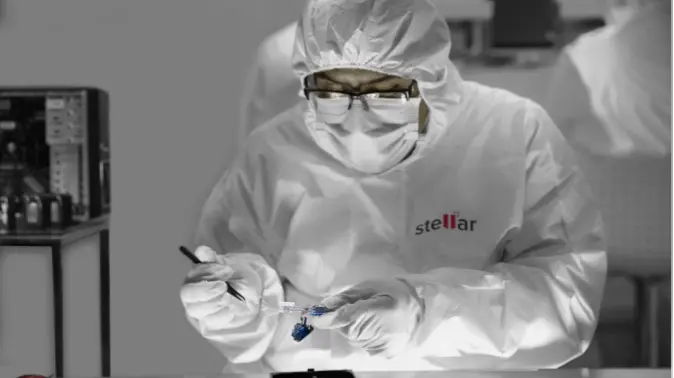
Look for professional data recovery services in your area that have an ISO-certified Class 100 Cleanroom lab. This is a must as it ensures that the hard disk will be disassembled and damaged parts will be replaced by experienced technicians in a regulated environment. Such areas are pressure and temperature-controlled and are free from microscopic dust, static electricity, and other interferences that can amplify the damage.
Final Thoughts
Hard disk damage can be devastating for both individuals and businesses. Hence, opting for professional assistance from industry-leading data recovery service providers like Stellar Data Recovery is the most secure option.
They are the only facility in India to have an ISO-approved Class 100 Cleanroom lab and an inventory of over 15,000 donor drives. Their team of HDD Recovery Specialists successfully handles more than 40,000 cases of malfunctioning hard drives and servers annually. They have the experience and sophisticated tools to recover data from even severely damaged hard drives, as well as access to the vast inventory from where fragile parts such as read/write heads are utilized before making clones of the hard drive to initiate the recovery work.
Therefore, if you suspect your hard disk to be physically damaged and are concerned about data loss, do not attempt to recover it yourself. Instead, rely on professional service providers like Stellar Data Recovery for the best results.