
Adobe Brings Photoshop, Premiere, and Other Creative Tools Directly Into Claude AI
Adobe says the connector is aimed at students, creators, small businesses, and everyday users who may not know how to navigate complex creative workflows.

;'%3e%3cpath%20d='m8,15.99c4.41,0,7.99-3.58,7.99-7.99S12.41,0,8,0,0,3.59,0,8s3.58,7.99,7.99,7.99Z'%20style='stroke:%23fff;%20stroke-miterlimit:10;%20stroke-width:.02px;'/%3e%3cpath%20d='m3.08,3.37l3.82,5.11-3.84,4.15h.87l3.37-3.64,2.72,3.64h2.94l-4.04-5.39,3.58-3.87h-.86l-3.1,3.35-2.5-3.35h-2.94Zm1.27.64h1.35l5.97,7.99h-1.35l-5.97-7.99Z'%20style='fill:%23fff;'/%3e%3c/g%3e%3c/svg%3e)


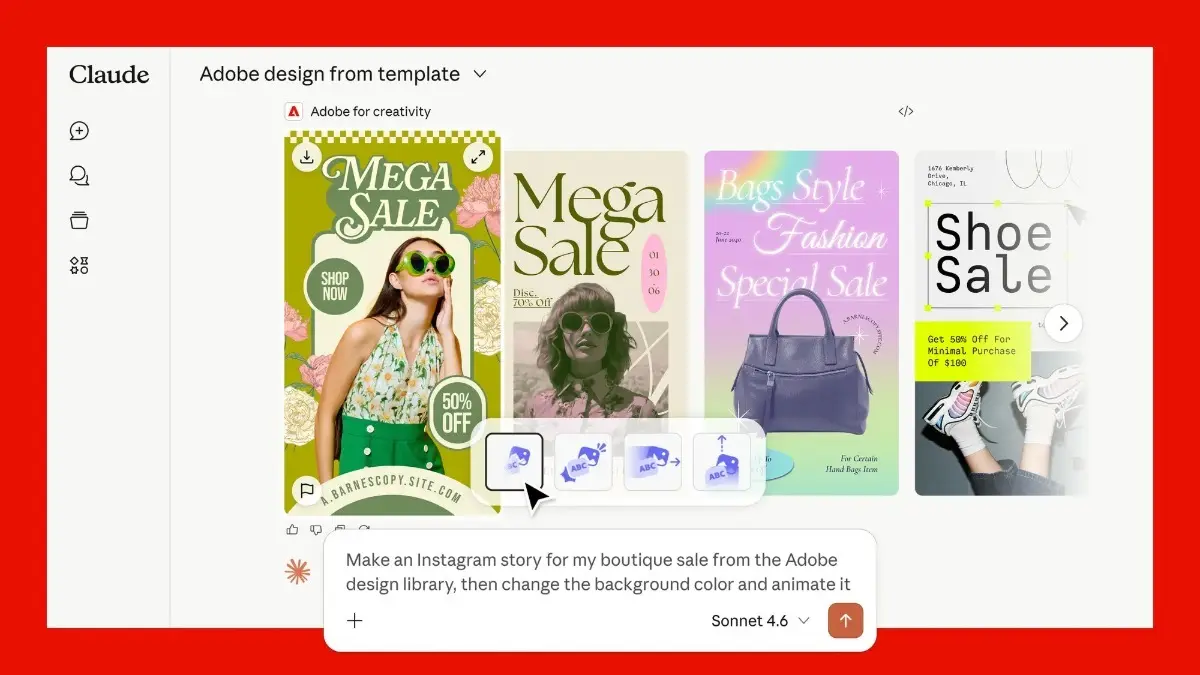
Adobe is expanding beyond its own apps and bringing its creative tools directly into Anthropic’s Claude AI assistant. The company has launched a new “Adobe for creativity” connector for Claude, allowing users to access and use tools from Photoshop, Illustrator, Premiere Pro, Lightroom, Firefly, and other Adobe apps through natural language prompts inside the chatbot.
Instead of manually switching between apps and workflows, users can simply describe what they want to create, and the connector handles the steps automatically.
Creative Workflows Inside a Chatbot
The connector is designed to orchestrate workflows across more than 50 Adobe creative tools directly within Claude.
For example, users can retouch portrait photos, resize videos for social platforms, create social media assets, edit graphics and layouts and format videos for Reels or Shorts. All by describing the outcome conversationally rather than opening individual apps and tools manually.
Advertisement
The system decides which Adobe tools to use and in what sequence.
Designed for Non-Professionals Too
Adobe is positioning this beyond professional designers and editors. The company says the connector is aimed at students, creators, small businesses, and everyday users who may not know how to navigate complex creative workflows.
Advertisement
The idea is to reduce the technical barrier. Instead of learning Photoshop layers or Premiere timelines, users can simply explain what they want done.
Examples of What It Can Do
Adobe highlighted several use cases for the connector.
Users can upload a headshot and ask Claude to improve lighting, blur the background, crop the image, and straighten the frame automatically.
Similarly, a horizontal video can be reformatted into vertical clips for Instagram Reels or YouTube Shorts without manually adjusting dimensions or cropping.
The connector also supports creating social media graphics through Adobe Express templates surfaced directly inside Claude.
How It Works
Users need a Claude account to access the connector. After installing the Adobe for creativity connector, users can connect their Adobe account to unlock additional tools, higher usage limits, and the ability to save work across sessions.
Adobe says projects can also be transferred back into apps like Photoshop, Firefly, or Express for more detailed editing later.