
Clubhouse now allows users to join rooms with web browsers, improves the Share button
The new Clubhouse feature is called Web Listening. There is also a new feature that will allow users to share an audio room on their social media platforms.
- Tech News
- 3 min read

;'%3e%3cpath%20d='m8,15.99c4.41,0,7.99-3.58,7.99-7.99S12.41,0,8,0,0,3.59,0,8s3.58,7.99,7.99,7.99Z'%20style='stroke:%23fff;%20stroke-miterlimit:10;%20stroke-width:.02px;'/%3e%3cpath%20d='m3.08,3.37l3.82,5.11-3.84,4.15h.87l3.37-3.64,2.72,3.64h2.94l-4.04-5.39,3.58-3.87h-.86l-3.1,3.35-2.5-3.35h-2.94Zm1.27.64h1.35l5.97,7.99h-1.35l-5.97-7.99Z'%20style='fill:%23fff;'/%3e%3c/g%3e%3c/svg%3e)


The audio-only social platform Clubhouse has rolled out a new update that will allow anyone on the internet to listen to conversations taking place on the app. Until now, the ability to listen to a Clubhouse conversation was restricted to users with the Clubhouse app. From now on, it would not be necessary for a user to have the Clubhouse app or an account on the app to listen to a conversation.
Initially, the feature will be available for Clubhouse users in the United States. It will allow users on the internet to listen to a Clubhouse conversation. On the flip side, creators hosting conversations on the application will have to allow replays for users with a web browser to access Clubhouse rooms. Additionally, since the feature is being rolled out as an experiment, there might be some bugs or functional instability in the beginning.
today we're introducing an easy new way to spread the word about great rooms. It's called...drumroll....SHARING! we invented this and nobody has thought of it before.
— Clubhouse (@Clubhouse) January 6, 2022
even better, when you share, people now have the option to listen on desktop – no login required 😇 pic.twitter.com/Gw2rFkMQcs
Clubhouse Web Listening features will allow users to enter a room with a web browser
The new Clubhouse feature is called Web Listening as the platform itself says, it "allows anyone to listen to a Clubhouse room from their phones or laptops, without needing to download an app or log in!" Additionally, the platform also says that the Clubhouse Web Listening feature will support major web browsers on both smartphones and laptops. In the future, the feature might be extended to more room types and countries around the world.
Clubhouse has also improved the Share button
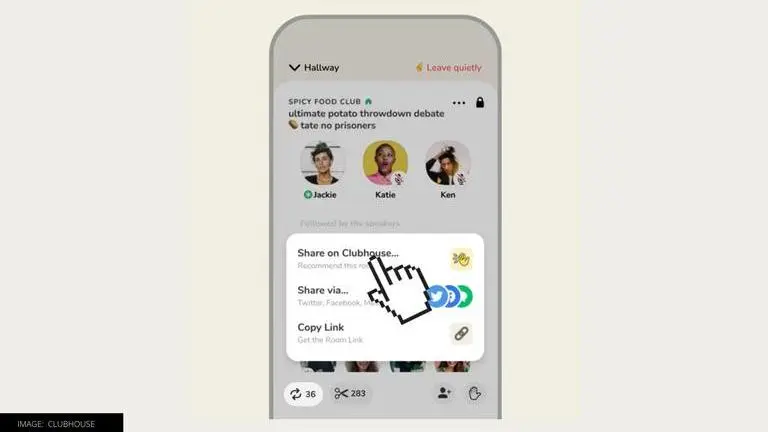
Apart from the web listening feature, Clubhouse has also rolled out a new feature that will allow users to share an audio room on their social media platforms. After the update is rolled out, when users will tap on the Share button located at the bottom of a room, they will see three options. The first option says "Share on Clubhouse." The second option says "share via a social network". The third option allows users to copy the link to share via a messaging platform.
Advertisement
Sharing on Clubhouse will allow users to add a comment and share a card with their followers, allowing them to join the room if it is life when they see it. Along with this, the audio-only social platform is also launching tools for creators that will help them understand how their rooms are performing by displaying Share and Clip counts at the bottom of the room. Additionally, there will also be a new Room Insights page.