
Google Phone App Gets Material 3 Redesign with Swipe-to-Answer Feature to Prevent Pocket Calls – Here’s How to Revert It
Google has rolled out a sudden Material 3 redesign for its Phone app, adding a swipe-to-answer feature to reduce pocket calls. Learn what’s new and how to revert the gesture setting.
- Tech News
- 2 min read

;'%3e%3cpath%20d='m8,15.99c4.41,0,7.99-3.58,7.99-7.99S12.41,0,8,0,0,3.59,0,8s3.58,7.99,7.99,7.99Z'%20style='stroke:%23fff;%20stroke-miterlimit:10;%20stroke-width:.02px;'/%3e%3cpath%20d='m3.08,3.37l3.82,5.11-3.84,4.15h.87l3.37-3.64,2.72,3.64h2.94l-4.04-5.39,3.58-3.87h-.86l-3.1,3.35-2.5-3.35h-2.94Zm1.27.64h1.35l5.97,7.99h-1.35l-5.97-7.99Z'%20style='fill:%23fff;'/%3e%3c/g%3e%3c/svg%3e)


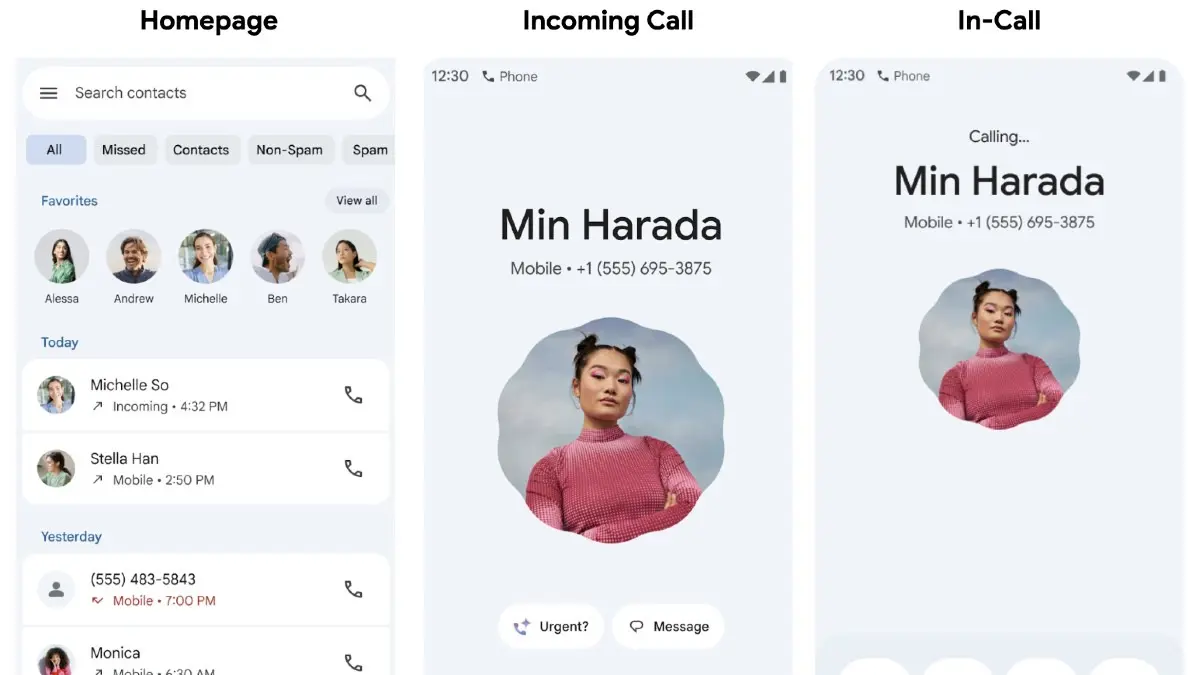
Google Phone app users have been caught off guard by a sudden visual overhaul. Google, without any prior announcements or changelog hints, has rolled out a major UI update powered by Material 3’s expressive design system, leaving many users surprised and, in some cases, frustrated.
The new Material 3 Expressive redesign brings a noticeable difference in both aesthetic and functionality aspects. The home screen of the app has now been consolidated into three main tabs. The Favorites and Recents sections have now been merged into a single Home tab. Starred contacts now show up as a horizontally scrolling carousel above the recent calls, and each item in the call list is now placed in a neat card-like box reflecting Material 3 design ethos.
The Keypad, now its own dedicated middle tab, replaces the previous floating action button (FAB). The dial pad sits on a newly rounded sheet, adding to the cohesive, soft-edged interface. As for Voicemail, the layout remains largely the same except for a more modern list design.
One significant change that users are witnessing is the relocation of Contacts, which has been moved into a navigation drawer. This drawer is accessible from the search bar at the top and also includes shortcuts to Settings, Clear Call History and Help & feedback.
Advertisement
Another big user-facing change that has left the internet divided is the redesigned incoming call screen. Google has integrated a new swipe-to-answer or decline gesture, replacing the traditional button tap interface. This gesture-based UI can be enabled or disabled via the new “Incoming call gesture” setting. According to Google, this feature is intended to prevent accidental call pickups or declines, particularly when pulling the phone out of your pocket.
How to Revert the Changes If You’re Not a Fan
If the new interface doesn’t appear very friendly to you, there is a way to revert these changes. The swipe-to-answer feature can be reverted to the old design with these quick steps.
Advertisement
Go to Settings and then Incoming Call Gestures. This will get your old dialer page back. Note that you can only revert this part of the design change and nothing else.