
How to Use Spotify Automix? Feature That Mixes Tracks Like a DJ
Available only to Premium subscribers, Spotify's Automix feature mixes songs and tracks like a DJ.
- Tech News
- 2 min read

;'%3e%3cpath%20d='m8,15.99c4.41,0,7.99-3.58,7.99-7.99S12.41,0,8,0,0,3.59,0,8s3.58,7.99,7.99,7.99Z'%20style='stroke:%23fff;%20stroke-miterlimit:10;%20stroke-width:.02px;'/%3e%3cpath%20d='m3.08,3.37l3.82,5.11-3.84,4.15h.87l3.37-3.64,2.72,3.64h2.94l-4.04-5.39,3.58-3.87h-.86l-3.1,3.35-2.5-3.35h-2.94Zm1.27.64h1.35l5.97,7.99h-1.35l-5.97-7.99Z'%20style='fill:%23fff;'/%3e%3c/g%3e%3c/svg%3e)


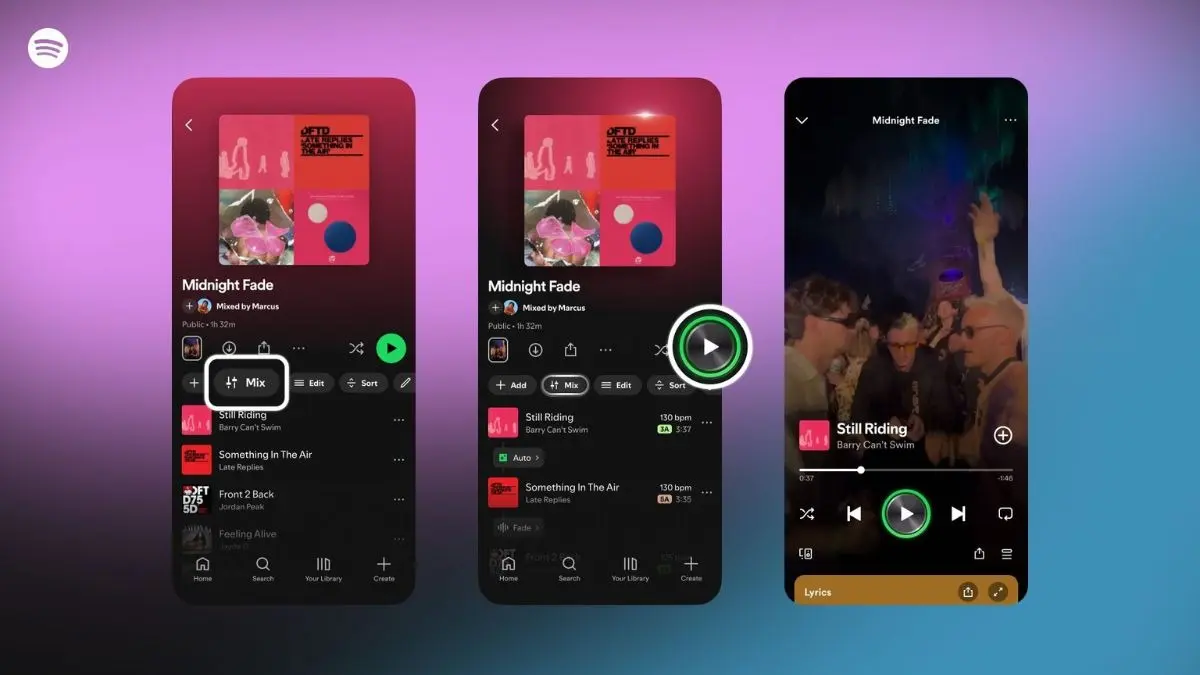
Spotify’s new Automix feature is like having a pocket DJ that blends your favourite tracks seamlessly. Whether you’re curating a workout mix, a party playlist, or just want smoother song transitions, Automix makes it possible without lifting a single fader. However, it is available only to Spotify Premium members. Here’s how to use it and how to take complete control of your mixes.
Getting started
Open a playlist you’ve already created, or start a brand new one. Once you’re inside, select Mix from the toolbar. Spotify will instantly analyse every track’s tempo, key, and beat grid, preparing transitions between songs. Start with Auto for an instant, algorithm-powered blend, or tap Customise to create transitions that suit your personal style.
Customising your mix
When you enter custom mode, choose a preset like Fade for smooth overlaps or Rise for more dramatic transitions. Then fine-tune individual elements: adjust volume curves, EQ balance, and effects, or use the visual waveform and beat markers to align transitions perfectly between songs. Once satisfied, hit Save and your personalised playlist mix is ready. You can share it directly or even collaborate with Premium friends on a shared Mixed Playlist. Need a break? Toggle the Mix button anytime to return the playlist to its original version.
Pro tips to sound like a DJ
- Match tempos and keys: For fluid transitions, pick songs with similar BPMs and Camelot keys. Spotify conveniently displays both when you tap Mix, helping you reorder tracks for a natural rhythm.
- Pick transition-friendly genres: Dance music like house, techno, trance, or disco tends to mix more cleanly than ballads or rock anthems.
- Shape the energy: Arrange your songs to gradually build or wind down intensity, creating a musical story rather than a shuffle of hits.
- Use it for every mood: Upgrade a running playlist for consistent pacing, keep a party mix continuous, or enhance road trip vibes by eliminating awkward silences.