
iOS 26 Public Beta Expected This Week—How to Download It, Eligible iPhones
iOS 26 first public beta version is expected to be released later this week, and here is how you can prepare for it.
- Tech News
- 3 min read

;'%3e%3cpath%20d='m8,15.99c4.41,0,7.99-3.58,7.99-7.99S12.41,0,8,0,0,3.59,0,8s3.58,7.99,7.99,7.99Z'%20style='stroke:%23fff;%20stroke-miterlimit:10;%20stroke-width:.02px;'/%3e%3cpath%20d='m3.08,3.37l3.82,5.11-3.84,4.15h.87l3.37-3.64,2.72,3.64h2.94l-4.04-5.39,3.58-3.87h-.86l-3.1,3.35-2.5-3.35h-2.94Zm1.27.64h1.35l5.97,7.99h-1.35l-5.97-7.99Z'%20style='fill:%23fff;'/%3e%3c/g%3e%3c/svg%3e)


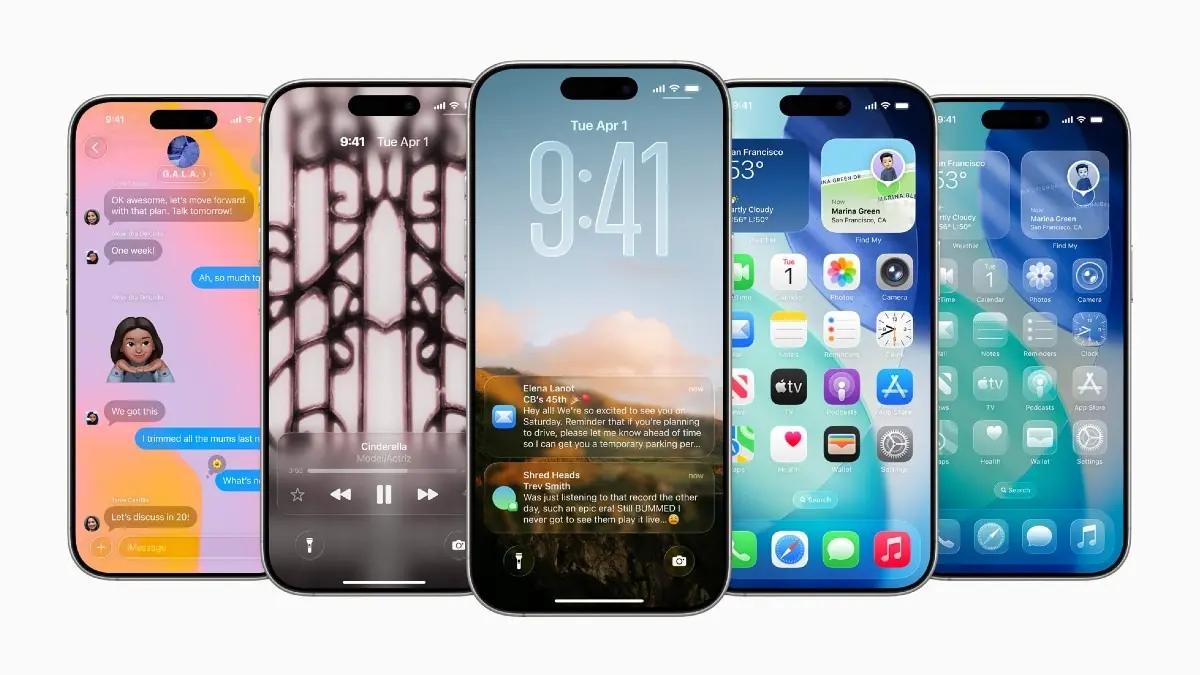
Apple is expected to roll out the first iOS 26 public beta build later this week, giving early testers a glimpse of the biggest revamp in the iPhone software since iOS 7. The highlight is Apple’s new Liquid Glass design language, which infuses glass-like translucent elements into the user interface for a more modern look. While the stable iOS 26 build will be released sometime in September, those interested in accessing the new features can prepare to download and install iOS 26 public beta on their eligible iPhone.
iOS 26 beta
iOS 26 was announced last month, with the developer beta out on the same day as the launch. Apple usually releases the first public beta build a month later, but in iOS 26’s case, the rollout has been delayed. It could be due to changes in the Liquid Glass interface. The first instance of Apple’s new design language was glassy, so much so that it made it difficult to read text in certain functions. After developers and early testers flagged issues, Apple toned down the effect in the second developer beta, only to receive flak for diluting the identity of Liquid Glass. With the first public beta, which makes the software available widely, it needs to find a middle ground: negligible legibility issues with translucent and glassy effects.
Eligible iOS 26 devices
iPhone 11 and higher devices are eligible for iOS 26. Those installing the public beta on top of an iOS 18 version should note that the build will be slightly buggy and could impact the smartphone experience. Those on developer betas can switch public beta for a less buggy experience.
- iPhone 17 series (iPhone 17, 17 Plus, 17 Pro, 17 Pro Max)
- iPhone 16 series (iPhone 16, 16 Plus, 16 Pro, 16 Pro Max)
- iPhone 16e
- iPhone 15 series (iPhone 15, 15 Plus, 15 Pro, 15 Pro Max)
- iPhone 14 series (iPhone 14, 14 Plus, 14 Pro, 14 Pro Max)
- iPhone 13 series (iPhone 13, 13 mini, 13 Pro, 13 Pro Max)
- iPhone 12 series (iPhone 12, 12 mini, 12 Pro, 12 Pro Max)
- iPhone 11 series (iPhone 11, 11 Pro, 11 Pro Max)
- iPhone SE (2nd generation and later)
How to download iOS 26 public beta
You need to enrol your Apple account and iPhone in the Apple Beta Software Program first. To do that, visit the beta enrolment website and sign up using your Apple ID. Ensure you have backed up your data safely on a different machine, like a Mac or Windows PC.
Advertisement
— On your iPhone, go to Settings > General > Software update.
— Tap Beta Updates.
— Select iOS 26 Public Beta and let your iPhone look for the necessary update.
— Tap Download and Install and follow on-screen prompts to start downloading the update.
— Once downloaded, you will be prompted to install the update immediately or later.