
With new Google filter, users can click selfies with artworks of Vincent van Gogh & others
Google Arts and Culture launched a new Google filter in which users can click selfies with artworks by Vincent van Gogh, Frida Kahlo, Johannes Vermeer & more.
- Tech News
- 3 min read

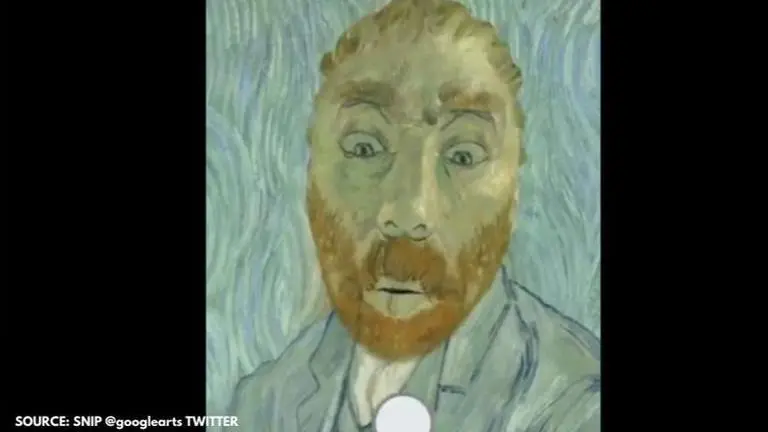
On October 7, 2020, Google Arts and Culture launched a new filter for users who love to click selfies. With the new filter, user's can capture selfies with works by Vincent van Gogh, Frida Kahlo, Johannes Vermeer, and other masters who are known for their phenomenal artwork. Once the users click on the filters, Google also highlights some historical information about the artwork. Here's a quick look at whose artwork filters can be used by users.
- Self portrait with Monkey by Frida Kahlo, 1938
- Helmet with Tengu Mask and Crows- Japanese, 19th century- The Metropolitan Museum of Art
- Self-Portrait by Vincent van Gogh, 1889- Musee d'Orsay, Paris
- Faience collar necklace- Amarna, Egypt, 1352-1327 BC- Royal Ontario Museum
- Girl with a Pearl Earring by Johannes Vermeer, c. 1665- Mauritshuis
A blog by Google stated that each filter has been crafted carefully so that the users can explore the artifacts in high-quality detail from every angle in this novel experience. The blog also mentioned that before people try out the filter, they will also see more about its history and context. If the users tap on 'View artwork', it takes them to a new page altogether with a short description of the artwork.
Sharing a glimpse of how many have used the Google filter, Google Arts and Culture's official Twitter handle posted a video. "Untouchable pieces of art history, now in the palm of your hand. Try on Vermeer's pearl earring or play with Frida's pet monkey all while learning more about the art and artist. Try #ArtFilter, found on your #GoogleArtsAndCulture App," read the tweet. Check out the video below.
Advertisement
Untouchable pieces of art history, now in the palm of your hand. Try on Vermeer's pearl earring or play with Frida's pet monkey all while learning more about the art and artist.
— Google Arts&Culture (@googlearts) October 7, 2020
Try #ArtFilter, found on your #GoogleArtsAndCulture App. https://t.co/UNSMFp7dKJ pic.twitter.com/bybTVq1FBq
Steps to use the new Google filter:
- On the homepage of the Google Arts and Culture app, there's a video for quick reference.
- To use the new filter, users need to click on the (New! Art Filter. Try filters based on artifacts from museums) which is a camera-shaped icon on the app.
- After which, users have to tap on an artwork or artifact.
- It will then allow the users to explore the new filters on the app.
Advertisement
#DidYouKnow that Van Gogh exchanged paintings of himself with 2 of his closest friends, Paul Gauguin & Émile Bernard?
— Google Arts&Culture (@googlearts) October 7, 2020
Create your own masterpiece - in Van Gogh's signature style using #ArtFilter.
Comment below to share your masterpiece with the 🌎.https://t.co/UNSMFp7dKJ pic.twitter.com/x3ptte71Qa