ASUS Zenbook S14 (2026) Review: A Windows Laptop That Made Me Forget About My MacBook
The ASUS Zenbook S14 combines a stunning OLED display, Intel's latest Core Ultra Series 3 processor, Copilot+ PC capabilities, a 77Wh battery, and one of the most premium designs I have seen on a Windows laptop.
- Tech News
- 8 min read

;'%3e%3cpath%20d='m8,15.99c4.41,0,7.99-3.58,7.99-7.99S12.41,0,8,0,0,3.59,0,8s3.58,7.99,7.99,7.99Z'%20style='stroke:%23fff;%20stroke-miterlimit:10;%20stroke-width:.02px;'/%3e%3cpath%20d='m3.08,3.37l3.82,5.11-3.84,4.15h.87l3.37-3.64,2.72,3.64h2.94l-4.04-5.39,3.58-3.87h-.86l-3.1,3.35-2.5-3.35h-2.94Zm1.27.64h1.35l5.97,7.99h-1.35l-5.97-7.99Z'%20style='fill:%23fff;'/%3e%3c/g%3e%3c/svg%3e)


For years, premium Windows laptops have had a peculiar problem. They either focus on performance and end up becoming heavy, noisy machines that need a charger every few hours, or they prioritise portability and sacrifice the power required for serious work. Finding a laptop that balances both has been surprisingly difficult.
The ASUS Zenbook S14 (2026) comes remarkably close.
Starting at ₹1,79,990 for the Core Ultra 7 model and going all the way up to ₹2,49,990 for the Core Ultra 9 386H variant I reviewed, the Zenbook S14 is ASUS's attempt at building the ultimate productivity laptop. It combines a stunning OLED display, Intel's latest Core Ultra Series 3 processor, Copilot+ PC capabilities, a 77Wh battery, and one of the most premium designs I have seen on a Windows laptop.
After using it as my primary work machine for several weeks, I came away impressed. Very impressed.
Advertisement
Not because ASUS reinvented the laptop. It didn't. It simply executed nearly everything extremely well.

What's Good
The design feels every bit as expensive as the price tag
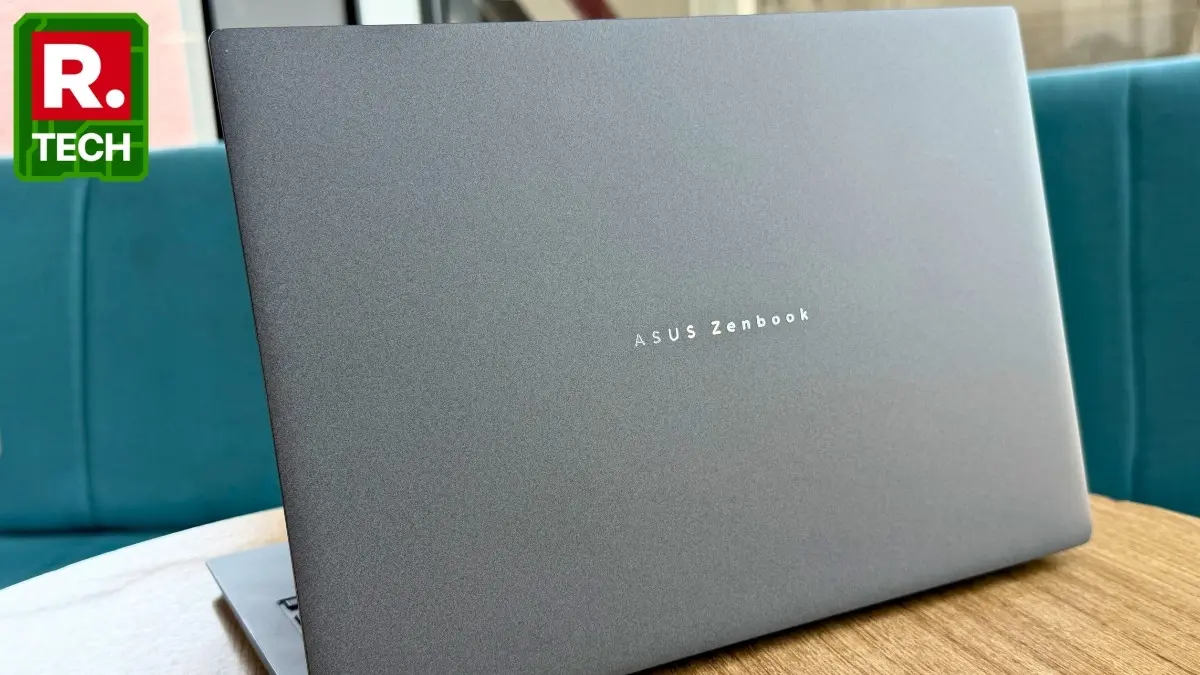
The first thing that struck me about the Zenbook S14 was how premium it feels. ASUS continues to use its Ceraluminum finish, a material that combines the durability of aluminium with a ceramic-like texture. The result is a surface that feels plush and luxurious every time you touch it. ASUS markets it as a fusion of art and technology. Marketing departments usually exaggerate. In this case, they may actually have a point.
Advertisement
The Antrim Gray unit I reviewed looked understated and professional.
When I casually mentioned the laptop's ₹2.5 lakh price tag to colleagues, nobody appeared surprised. The machine genuinely looks like it belongs in that price bracket.
At just 1.2kg and roughly 1.1cm thick, carrying it around is effortless. ASUS even bundles a sleeve inside the box, making it easier to throw the laptop into a backpack without worrying about scratches.
The hinge deserves special mention, too. Opening the lid requires only one hand, something that sounds trivial until you realise how many premium laptops still fail this test.
The bezels around the 14-inch display are minimal, making the laptop feel smaller than it actually is. At the top sits a Full HD webcam alongside an IR sensor that supports Windows Hello facial recognition. Unlocking the laptop is almost instantaneous, and authentication for sensitive tasks feels seamless.
One of my favourite design elements, however, sits below the display. The CNC-machined grille looks like a speaker vent at first glance. It isn't. It's actually part of the vapour chamber cooling system.
It's the kind of design flourish that makes the Zenbook feel engineered rather than merely assembled.
The OLED display is spectacular
The 14-inch 3K ASUS Lumina OLED display is among the best screens I have used on any Windows laptop. Colours are vibrant without appearing cartoonish. Blacks are perfectly inky. Contrast is effectively infinite.
As somebody who regularly edits photos, videos, and product images, I appreciated the colour accuracy. The panel supports multiple colour profiles that can be customised through the MyASUS app, depending on whether you prefer vibrant colours or more muted tones.
Watching content was an even bigger treat. While binge-watching Off Campus, the deep blacks and rich reds made me abandon my miniLED television more than once. The OLED panel simply looked better.
The display also supports HDR and Dolby Vision for compatible content on Netflix, Prime Video, and JioHotstar. Movies look fantastic, especially darker scenes where OLED technology truly shines.
The touchscreen implementation is excellent as well. I frequently used it for signing documents before sending them via email, which saved me from reaching for my phone.
Scrolling feels exceptionally fluid thanks to the 120Hz refresh rate. On battery, you can switch to 60Hz for better endurance. When plugged in, Dynamic Refresh Rate intelligently switches between refresh rates depending on the content being displayed.
It makes Windows feel smoother than it has any right to.
The keyboard and touchpad are a joy to use
As someone whose job largely involves writing thousands of words every day, keyboard quality matters enormously. Thankfully, ASUS nailed it.
The backlit chiclet keyboard offers short yet satisfying key travel. The keys aren't overly soft, and they aren't stiff either. Typing articles, scripts, emails, and documents felt effortless. I regularly spent entire workdays typing without experiencing fatigue.
The touchpad is equally impressive. It's large, accurate, and responsive. Windows gesture navigation works flawlessly, making multitasking considerably easier.
ASUS has also integrated gesture controls directly into the touchpad. Sliding your finger along one side adjusts brightness while the opposite side controls volume.
Initially, it felt gimmicky. A week later, I found myself using it constantly.
The performance is absurdly good
The Intel Core Ultra 9 386H processor inside my review unit is an absolute monster. Combined with 32GB RAM and a 1TB SSD, the laptop simply refuses to slow down. I routinely had dozens of Chrome tabs open alongside Photoshop, Lightroom, Premiere Pro, Slack, Spotify, and multiple Word documents.
Nothing stuttered. Nothing crashed. Nothing even appeared mildly inconvenienced.
Photo editing in Lightroom felt instantaneous. Rendering 4K footage in Premiere Pro happened significantly faster than I expected from a machine this thin. Benchmark results also place the Zenbook among the stronger-performing ultraportables currently available.
What impressed me most wasn't raw performance. It was consistency.
The workflow remained smooth throughout. At one point, I genuinely forgot I was using a Windows machine, which is perhaps the biggest compliment I can give a laptop.
The battery life is MacBook territory
The 77Wh battery is phenomenal. My typical workday involves web browsing, writing articles, editing images, watching videos, and managing communication apps.
The Zenbook S14 comfortably lasted an entire workday without requiring a charger.
Even more impressive is that battery life doesn't collapse the moment you begin pushing the machine slightly harder.
Photo editing naturally consumes more power. Video rendering consumes even more. But the endurance remains respectable throughout. For heavy creative workloads, I would still recommend staying plugged in because the laptop unlocks its full performance potential that way.
For everything else, battery anxiety simply isn't part of the experience.
The speakers and webcam exceed expectations
Laptop speakers often disappoint. The Zenbook S14's speakers do not. The four-speaker setup produces loud and rich audio with enough depth to make movies and music enjoyable. Dolby Atmos support enhances compatible content, while ASUS Smart Amp technology improves audio quality for everything else.
The 1080p webcam is similarly good. Video calls look sharp and natural. Combine Studio Effects with ASUS's AI-powered noise cancellation, and the experience becomes significantly better than what most Windows laptops offer.
For people who spend hours in meetings, that's a meaningful advantage.
What's Bad
The touchscreen feels underutilised
This is my biggest complaint. The touchscreen itself works beautifully. The problem is that the laptop only opens to around 145-150 degrees.
I kept finding myself wishing the Zenbook could fold into a tablet like a Yoga or Spectre. Many people may never care about this limitation. But once you've used a convertible laptop, having a touchscreen without tablet functionality starts feeling slightly incomplete.
The display is extremely reflective
The OLED panel looks incredible indoors. Take it near a bright window or outdoors, and things change quickly. The glossy finish reflects almost everything around you. Strong lighting sources can become distracting, especially when viewing darker content.
This isn't unique to ASUS. Most OLED laptops suffer from the same issue. But it's worth mentioning because it occasionally impacted my experience.
No fingerprint sensor
The Windows Hello facial recognition system works extremely well most of the time. The problem arises during the rare moments it doesn't.
Low lighting conditions or awkward viewing angles can occasionally prevent facial recognition from triggering. When that happens, you have to fall back to a PIN or password because ASUS hasn't included a fingerprint scanner.
It's a small inconvenience. At ₹2.5 lakh, however, small inconveniences become more noticeable.
It isn't a gaming laptop
This shouldn't surprise anyone. The Zenbook S14 is designed for creators and professionals, not gamers.
Casual titles run perfectly well. Cloud gaming works beautifully.
But demanding AAA games quickly expose the limitations of the integrated Intel graphics solution. Titles like Genshin Impact remain playable only at lower graphics settings. If gaming sits high on your priority list, ASUS's ROG lineup makes considerably more sense.
The fan noise becomes noticeable
The cooling system does an excellent job of controlling temperatures. The trade-off is noise.
Under heavy workloads like rendering videos or exporting large projects, the fans spin up aggressively enough to become audible. It's not unbearable.
Switching to Standard or Whisper modes helps significantly. Still, it's one of the few reminders that the Zenbook is working hard beneath its polished exterior.
Verdict
Rating: 4/5
The ASUS Zenbook S14 (2026) is one of the best Windows laptops I have used in recent years. It combines exceptional build quality, a stunning OLED display, excellent battery life, top-tier productivity performance, strong speakers, and genuinely useful AI-powered features inside a chassis that weighs only 1.2kg.
It's not perfect. The reflective display can be frustrating. The touchscreen feels underutilised. The absence of a fingerprint sensor is puzzling. And gamers should look elsewhere.
But these complaints feel relatively minor once you start living with the laptop every day. The biggest compliment I can give the Zenbook S14 is this: I never felt limited by it.
Whether I was writing articles, editing photos, rendering videos, attending meetings, or simply watching Netflix after work, the laptop handled everything without drama.
At ₹2,49,990, it isn't cheap. But premium products aren't supposed to be. They're supposed to justify their price.
The Zenbook S14 does exactly that.